Duotone Effect
Click, paste or drag and drop files to edit
Select an image file jpg, png, webp

Drag and drop
OR
How to create a duotone image
Upload an image
Use the form above to load an image. Click the 'Upload image' button, copy and paste or drag and drop an image into the uploader.
Adjust
Select the gradient colors using the color picker controls.
Apply
Click 'Reset' to get the original image. The 'Apply' button saves the changes to the image.
Learn More About Duotone
On this page
1. About Duotone Effect
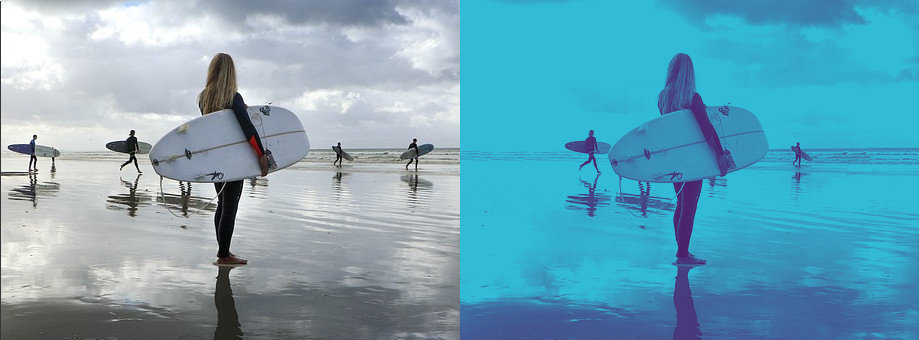
The duotone effect is a photographic technique that uses two colors to create an image with a distinct color scheme. Typically, one color is applied to the shadows and another to the highlights, producing a visually striking effect that emphasizes contrast and mood in the image.
Easily apply the duotone effect to your images online with the free online image and photo editor available at gifgit.com. Use the duotone tool to select the gradient colors and apply the effect to your image. Upload an image from your computer or use a sample image to try the duotone effect.
2. Tool Features
- Select the gradient colors for the duotone effect using the color picker controls.
- Preview the effect in real-time on your image.
- Reset the image to its original state if needed.
