Unsharp Mask
Click, paste or drag and drop files to edit
Select an image file jpg, png, webp
Drag and drop
OR
How to apply the unsharp mask filter
Upload an image
Use the form above to load an image. Click the 'Upload image' button, copy and paste or drag and drop an image into the uploader.
Adjust
Adjust the settings in the tool options bar to control how the unsharp mask is applied to the image.
Download or save
Export and download your edited image or save it to your account.
Learn More About
the Unsharp Mask Effect
On this page
1. About the Unsharp Mask Effect
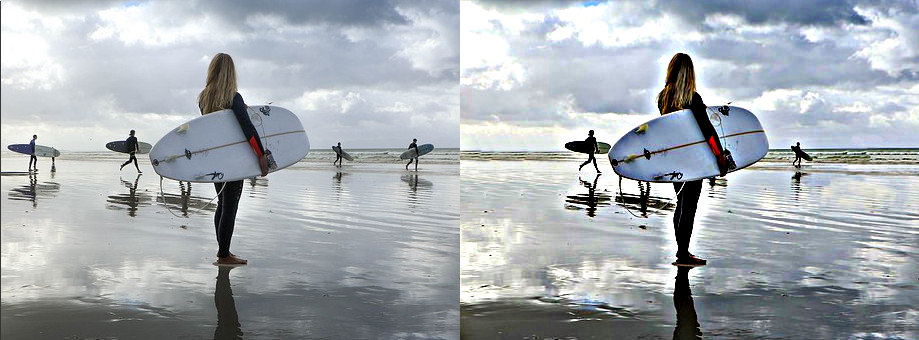
The unsharp mask effect is a filter used to enhance the sharpness of an image. It works by increasing the contrast along the edges within the image, making details appear more defined and crisp. It uses a blurred version of the negative of the image to determine which areas to enhance, effectively sharpening the image without introducing excessive noise.
2. How the Unsharp Mask Effect Works
The unsharp mask effect works by creating a blurred version of the image and then subtracting it from the original image to detect edges. The detected edges are then enhanced by increasing the contrast along them, which makes the image appear sharper.
